How to Design High-Converting Landing Pages SEO & Infrastructure Suite. ” Stop the AI Tsunami: Is Your Career Ready for 2026? Get the 5-Step Blueprint to Job-Proof Your Career in 2026. DOWNLOAD FREE“
From Confusion to Clarity: Master the Global Digital Economy.
The Problem: Most people fail online because they don’t understand how the money moves. They chase “get-rich-quick” schemes instead of economic systems.
The Solution: This course is your 2026 Compass. Learn to identify high-profit opportunities in the digital space before the market gets crowded.
Start Now – Master the Market
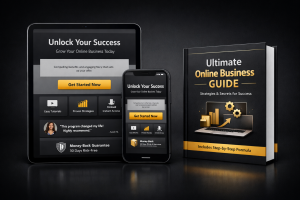
Let’s be honest: traffic is completely useless if your landing page looks like a digital junk drawer. You could drive thousands of visitors to your website, but if your page doesn’t instantly hook them and guide them to the checkout, you are just throwing time and money away.
A premium sales funnel isn’t about tricking people into buying. It’s about creating an undeniable, high-value visual narrative that makes purchasing your digital product feel like the easiest decision your visitor will make all day.
Here is anatomy of a high-converting, premium landing page.
1. The Hero Section (Above the Fold)
This is the space visitors see before they scroll down. You have exactly less than three seconds to answer three critical questions: What is this? Who is it for? How do I get it?
-
The Headline: Focus on the ultimate transformation. Instead of “A Book About AI,” try “The Agentic AI Implementation Workbook: Automate Your Workflow and Reclaim 10 Hours Every Week.”
-
The Visual: Show a high-quality mockup of your digital product. If it’s an ebook or workbook, give it a sleek, tangible 3D cover graphic.
2. Agitate the Problem, Present the Solution
Before you list your product features, validate your reader’s frustrations. Speak directly to their pain points. Are they overwhelmed by tech? Are they struggling to monetize their skills? Once they see that you truly understand their problem, introduce your premium digital products as the definitive, stress-free bridge to their goals.
3. Visual Scan ability with Layouts
Nobody reads massive walls of text on a screen anymore. They skim.
-
Design Tip: Use the Elementor page builder to break your copy into distinct, beautifully spaced blocks. Use icon lists to highlight the key benefits, bold your most impactful phrases, and use contrasting background colors to separate your pricing tiers.
